Know where every wedding rupee goes.
A ready-to-use Google Sheets planner for your wedding budget, vendor payments, guest RSVPs, tasks and rituals. One shared plan for both families.
- Instalment-wise vendor payments with overdue flags
- Guest list and RSVPs by function: Mehendi, Sangeet, Wedding, Reception
- South and North Indian ritual presets you can edit
One-time payment. No subscription. Works in Google Sheets on phone and laptop.
Sample data for a fictional couple
Wedding money gets messy fast.
Advances on WhatsApp, balances in a notebook, three versions of the guest list. Here is what changes when everything lives in one sheet.
We set a budget, but nobody notices when a cost goes past its planned amount.
Every cost shows planned cap, forecast and variance. Anything over its cap is highlighted.
Photographer, caterer, decor, mandapam: who got how much advance, and what is still left?
Each instalment has a due date, amount paid and outstanding balance. Overdue ones are flagged.
Bride side, groom side, who replied, who is coming to which function?
One RSVP sheet with side, invitation status and attendance for Mehendi, Sangeet, Wedding and Reception.
The date is close and nobody knows which tasks are done or who owns them.
22 starter tasks with owners and priority. Due dates fill in from your wedding date.
One person has the details on WhatsApp, another in a notebook. Nobody has the latest.
One Google Sheet that you share with both families. Everyone sees the same numbers.
Screenshots from the actual file
Every number below is worked out by the planner’s own formulas, using fictional sample data for a couple called Karthik and Meena.
Swipe sideways to see the whole sheet. Tap to open full size.
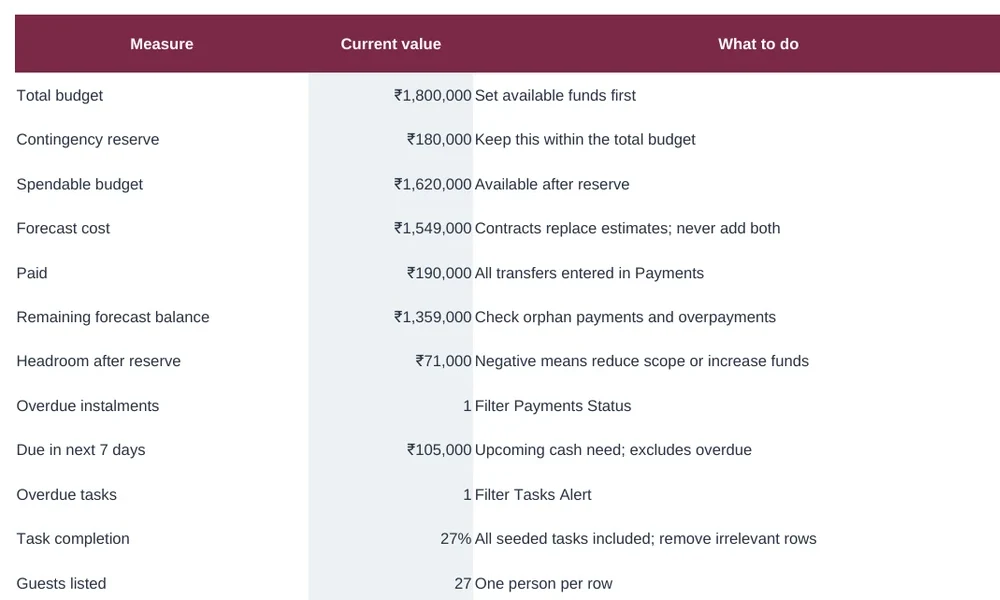
Dashboard
- Total budget, reserve, spendable budget and headroom after reserve in one column
- Overdue instalments and the cash you need in the next 7 days
- Planned cap versus forecast for every category, with a chart
Swipe sideways to see the whole sheet. Tap to open full size.
Budget
- Planned cap, latest estimate, contract total and forecast side by side
- Paid and balance fill in automatically from the Payments tab
- A cost that goes over its cap is highlighted in red
Swipe sideways to see the whole sheet. Tap to open full size.
Payments
- One row per instalment, and part-payments are supported
- Overdue instalments turn red using your planning-as-of date
- A link check catches payments that do not match a budget item
Swipe sideways to see the whole sheet. Tap to open full size.
Guests & RSVP
- One person per row with side, household and invitation status
- Attendance by function: Mehendi, Sangeet, Wedding, Reception
- Diet or access needs, rooms and pickups tracked per guest
Swipe sideways to see the whole sheet. Tap to open full size.
Tasks
- 22 starter tasks from 180 days before the wedding to 10 days after
- Due dates fill in on their own once you enter the wedding date
- Overdue and due-this-week flags on the sheet, with an owner for every task
Swipe sideways to see the whole sheet. Tap to open full size.
Wedding Day Binder
- Built automatically from your Rituals & Timeline tab
- Lead, venue and handover items for each event, ready to share
- Emergency lead and family coordinator shown at the top
Screenshots show the planner with fictional sample data, for illustration.
Everything in one workbook
Budget, payments, guests, vendors, tasks, rituals and the wedding day are linked, so you enter each thing once.
A short setup guide, step by step
Budget, payments, guests and tasks at a glance
Names, date, total budget, reserve and city
Planned cap, estimate, contract, forecast, paid, balance
Instalments, due dates and outstanding amounts
Starter checklist with owners and auto due dates
Households, sides, RSVPs and event attendance
Compare like-for-like quotes and cancellation terms
South and North Indian presets, fully editable
Group room bookings, vehicles and pickups
A live handover view built from your timeline
Decisions, negotiations and follow-ups
The dropdown lists, which you can customise
Set your reserve, see your headroom
The planner sets aside a contingency reserve and shows how much room is left. Try it with your own numbers.
Same maths as the planner’s Dashboard: reserve = total × contingency %, spendable = total − reserve, headroom = spendable − forecast cost.
Whoever is holding the wedding together
Couples planning together
Both of you see the same budget, payments and tasks. No more asking “did we pay them?”
Parents and family coordinators
Keep the money trail for the family. Share the sheet and give each relative their own tasks.
Anyone done with WhatsApp and notebooks
Move every number and promise into one place that is easy to search and update.
Start planning in 3 steps
No software to install. If you have a Google account, you are ready.
Buy the planner
Pay ₹199 once through secure checkout. The access link is emailed to the address you used at checkout.
Make your copy
Open the emailed link, signed in to Google, and choose Make a copy. Now it is yours to edit, and the original stays untouched.
Start planning
Fill the amber cells in Wedding Details, then add costs, payments and guests. Grey cells calculate on their own.
Your wedding, in one clear sheet
One-time payment. No subscription.
- Editable Google Sheets planner
- 13 connected tabs
- Budget and payment tracking with overdue flags
- Guest list and RSVP by function
- Vendor quote comparison
- Task checklist with auto due dates
- South and North Indian ritual presets
- Dashboard and wedding day binder
Merchant: You are one step away from success, Madurai, Tamil Nadu, India. Support: support@onestepawayfromsuccess.com. Please read our Refund & Cancellation Policy before you buy.
Answers before you buy
What exactly do I get?
Can I use it on my phone?
Can both families use it together?
Our wedding has different functions. Can I change it?
Do I need to know spreadsheets?
How do I receive it after payment?
Is this a wedding planning service?
Can I get a refund?
Stop guessing. Start tracking.
One planner for your budget, payments, vendors, guests and tasks.
Get the Planner · ₹199